

Anyone could see the road that they walk on is paved in gold,
It's always summer, they'll never get cold,
They'll never get hungry,
They'll never get old and gray.
You can see their shadows wandering off somewhere,
They won't make it home,
But they really don't care,
They wanted the highway,
They're happier there today, today
The Way II
Monday, March 22, 2010

Oh, can I have a bear?
Sunday, November 22, 2009
This is the conversation that should have happened and needs to happen.
[19:41] Linden Lab: Hey, Eloh... about the 1,495 "sales" of your freebies on Xstreet over the last 90 or so days...
[19:41] Eloh Eliot: Ja, I know! Awesome, right?
[19:42] Linden Lab: Well, yeah... except that every time one of your freebies sells, it costs us $0.50 in fees and God kills a puppy.
[19:42] Eloh Eliot: T_T
[19:42] Eloh Eliot: I'm sorry! I didn't know. I'll take them down right now!
[19:42] Linden Lab: Cool, thanks for understanding!
[19:43] Eloh Eliot: np! Oh, can I have a bear? ^^
A Reasonable Proposal: For Preventing the Freeloading Culture of Second Life and Its Proponents From Cluttering Xstreet and Annihilating the Fundamental Values of Commerce, Society, Kingdon & Country
Saturday, November 21, 2009
The saying goes, "cooler heads will prevail"—and as much as the Second Life vox populi enjoy a good thumping show of drama (especially one where Linden administrators and policy are inextricably intertwined)—it's perhaps best to consider and analyze the more rational arguments of a debate before prematurely committing to any potentially irreversible or even harmful actions.
If one is currently a successful and profitable merchant on Xstreet, then there's absolutely no financial benefit to remove one's items before the new policies begin, and even afterwards, merchants may wish to wait until enough solid sales data has been collected to be able to compare them to previous figures in an empirical manner before ultimately making the decision to either remain with or leave Xstreet.
A spirited and passionate boycott of Xstreet—while commendable in its zeal and fervor—is both futile and fundamentally flawed. This boycott only confirms the exact nature and purpose of the policy that one is protesting: that the items removed in protest were of such detriment or low-value anyway that they were unbefitting of Xstreet and would have likely been culled in the implementation of policy.
Regrettably, mistakes were made. But those mistakes can be corrected with the proper and rational recourses. Understand this: there is categorically no reason anyone should not charge for items of value on Xstreet—because the labor and creativity required to produce such value do not come without cost—it is as expressed by Parmenides: "nothing comes from nothing."
Our Linden administrators of commerce have righteously postulated a very relevant corollary to Parmenides' axiom—one with a more societal context: that the costs of value-producing labor and creativity should be and must be shared by all. A nil investment garners no improvement for the world and only harbors and perpetuates values unbecoming of a studious, productive, and growing society. Things of value must be paid for, and to do so otherwise would be theft: they cannot be simply ill-gotten like things of little or no value.
So, today, it is with great pride, now that we have realigned our business model with the same grand society-building vision of our Linden administrators of commerce, that we announce, exclusive to Xstreet, our new and improved, special-edition, value-added, premium skins:
The ✻✻LIFE of LUXURY✻✻ Eloh Eliot Gorgeous Masterskinworks Skin Collection 2008-2009 "The Free ♥♥♥ Spirit of Gradient Mesh Years" (Female)
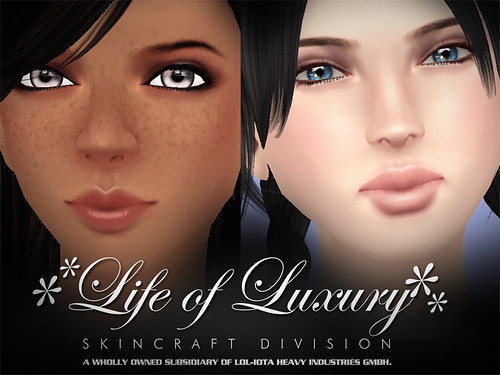
In celebration of this inaugural product, this skin collection will be offered at a drastically discounted introductory price of only L$6,000,000.
We can somewhat understand how many of you may now perceive us to be driven by nothing more than sheer money-grubbing greed—but rest assured, we are not.
We have spent literally thousands of hours researching, developing, improving, and testing our skins over the course of many years across an enormous variety of viewers and lighting engines. These high-quality and high-value skins are of the utmost seamless precision, craftsmanship, and creative artistry and could only have come to fruition at a great and Sisyphean cost to us in time, money, and resources.
While, we believe that we are offering the best-quality and the best-value product we can at a very reasonable price, it still pales in comparison with the greater aspect of why we commit ourselves to such arduous travails:
This was all done for you—the greater Second Life community.
Each time you buy our skins, it not only covers original costs of development, but also allows for further development and improvement of all future lines of skins and expansion into other product lines, segments, and industries.
These future lines of skins and other products will most certainly be better and more brilliant than any current items—and these future items will be things you, the Second Life community, will want to, need to, and must purchase, thereby further perpetuating the vital cycle of commerce.
Additionally, portions of every sale are passed along to our Linden administrators of commerce, which allows them to further develop and improve the vital Xstreet infrastructure that enables the ebb and flow of trade in Second Life—without which Second Life, as a society and a world, would crumble and die.
We, as a society, cannot simply afford to have these skins given away for no value whatsoever—that would be tantamount to theft: robbing not only our world, but all of us of the proper dues for the ongoing upkeep and future betterment of the society in which we all inhabit. So by offering such high-quality skins at such reasonable prices, we reaffirm our dedication to improving our world and our people—and from our sales, we hope to bring society a windfall that will shower enormous benefits and advantages on all its denizens. It is, therefore, your civic duty to pay for these skins—and to continue doing so again and again.
Things of value must simply be paid for. For you. For me. For Kingdon and country.
If one is currently a successful and profitable merchant on Xstreet, then there's absolutely no financial benefit to remove one's items before the new policies begin, and even afterwards, merchants may wish to wait until enough solid sales data has been collected to be able to compare them to previous figures in an empirical manner before ultimately making the decision to either remain with or leave Xstreet.
A spirited and passionate boycott of Xstreet—while commendable in its zeal and fervor—is both futile and fundamentally flawed. This boycott only confirms the exact nature and purpose of the policy that one is protesting: that the items removed in protest were of such detriment or low-value anyway that they were unbefitting of Xstreet and would have likely been culled in the implementation of policy.
Regrettably, mistakes were made. But those mistakes can be corrected with the proper and rational recourses. Understand this: there is categorically no reason anyone should not charge for items of value on Xstreet—because the labor and creativity required to produce such value do not come without cost—it is as expressed by Parmenides: "nothing comes from nothing."
Our Linden administrators of commerce have righteously postulated a very relevant corollary to Parmenides' axiom—one with a more societal context: that the costs of value-producing labor and creativity should be and must be shared by all. A nil investment garners no improvement for the world and only harbors and perpetuates values unbecoming of a studious, productive, and growing society. Things of value must be paid for, and to do so otherwise would be theft: they cannot be simply ill-gotten like things of little or no value.
So, today, it is with great pride, now that we have realigned our business model with the same grand society-building vision of our Linden administrators of commerce, that we announce, exclusive to Xstreet, our new and improved, special-edition, value-added, premium skins:
The ✻✻LIFE of LUXURY✻✻ Eloh Eliot Gorgeous Masterskinworks Skin Collection 2008-2009 "The Free ♥♥♥ Spirit of Gradient Mesh Years" (Female)
In celebration of this inaugural product, this skin collection will be offered at a drastically discounted introductory price of only L$6,000,000.
We can somewhat understand how many of you may now perceive us to be driven by nothing more than sheer money-grubbing greed—but rest assured, we are not.
We have spent literally thousands of hours researching, developing, improving, and testing our skins over the course of many years across an enormous variety of viewers and lighting engines. These high-quality and high-value skins are of the utmost seamless precision, craftsmanship, and creative artistry and could only have come to fruition at a great and Sisyphean cost to us in time, money, and resources.
While, we believe that we are offering the best-quality and the best-value product we can at a very reasonable price, it still pales in comparison with the greater aspect of why we commit ourselves to such arduous travails:
This was all done for you—the greater Second Life community.
Each time you buy our skins, it not only covers original costs of development, but also allows for further development and improvement of all future lines of skins and expansion into other product lines, segments, and industries.
These future lines of skins and other products will most certainly be better and more brilliant than any current items—and these future items will be things you, the Second Life community, will want to, need to, and must purchase, thereby further perpetuating the vital cycle of commerce.
Additionally, portions of every sale are passed along to our Linden administrators of commerce, which allows them to further develop and improve the vital Xstreet infrastructure that enables the ebb and flow of trade in Second Life—without which Second Life, as a society and a world, would crumble and die.
We, as a society, cannot simply afford to have these skins given away for no value whatsoever—that would be tantamount to theft: robbing not only our world, but all of us of the proper dues for the ongoing upkeep and future betterment of the society in which we all inhabit. So by offering such high-quality skins at such reasonable prices, we reaffirm our dedication to improving our world and our people—and from our sales, we hope to bring society a windfall that will shower enormous benefits and advantages on all its denizens. It is, therefore, your civic duty to pay for these skins—and to continue doing so again and again.
Things of value must simply be paid for. For you. For me. For Kingdon and country.